Investigating Enabler Upgrade Issues: Difference between revisions
No edit summary |
|||
| Line 18: | Line 18: | ||
c:\enabler>ren *.oll *.dll</pre> | c:\enabler>ren *.oll *.dll</pre> | ||
Alternatively the *.dll and *.exe of the previous version can be copied from another till and replaced in the enabler folder. An upgrade can then be re run to guarantee all files on this machine are on correct enabler version. | Alternatively the *.dll and *.exe files of the previous version can be copied from another till and replaced in the enabler folder. An upgrade can then be re-run to guarantee all files on this machine are on correct enabler version. | ||
Revision as of 05:15, 25 May 2011
This page is currently being updated. If you are currently experiencing issues with Enabler upgrades, please contact Magenta Support (AU 1800 111 475, NZ 0800 088 475)
Note: If unsure of the cause of the upgrade failure, contact Magenta Support for assistance before continuing
How to recover from an auto upgrade that has partially run but failed
During the upgrade process the system will rename existing files and tables and then copy in new version of the files and tables and then migrate the old with the new. Once this migration is complete a reindex processes then runs across the new tables, occasionally this process can be interrupted and cause the upgrade to not fully complete. Re-running the upgrade process after a failure can potentially cause loss of data so file sizes and modified dates will need to be reviewed prior to re running upgrade.
Unable to open Enabler after upgrade
The application files in the enabler folder require being from the same version. If any of the application files in the enabler folder do not fully or properly migrate then usually a message similar to the following will display when any attempts to open enabler applications are made
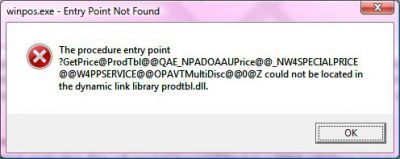
This usually indicates one or more of the files are on a different version The original application files will need to renamed back to their original extension prior to re-running upgrade
c:\enabler>ren *.oxe *.exe
then
c:\enabler>ren *.oll *.dll
Alternatively the *.dll and *.exe files of the previous version can be copied from another till and replaced in the enabler folder. An upgrade can then be re-run to guarantee all files on this machine are on correct enabler version.
