Investigating Enabler Upgrade Issues: Difference between revisions
No edit summary |
|||
| Line 19: | Line 19: | ||
Alternatively the *.dll and *.exe files of the previous version can be copied from another till and replaced in the enabler folder. An upgrade can then be re-run to guarantee all files on this machine are on correct enabler version. | Alternatively the *.dll and *.exe files of the previous version can be copied from another till and replaced in the enabler folder. An upgrade can then be re-run to guarantee all files on this machine are on correct enabler version. | ||
===Database Migration Failure=== | |||
'''NOTE:''' Database migration failure gets logged in the \enabler\migrate.txt file. Open migrate.txt in notepad to see what database failed to migrate. | |||
[[Image:Investigating_Enabler_Upgrade_Issues_Figure_2.jpg|400px|link=]] | |||
Migration takes empty database files from the \upgbase directory (This is a data dictionary of sorts as the files in upgbase hold the latest fresh database files with the latest correct structures from the last upgrade performed – an upgrade needs to have been performed for the \upgbase folder to exist) and puts them in to your relevant local, lantran etc directories. When this process is performed, the data contained in the existing .dbf files is not lost, it is copied/migrated to the new files, thereby extending the file structure definition without losing data. E.G: posprod.dbf has a new database field added to the file structure. The upgrade will place the new version of this file into the \upgbase folder. When the upgrade process performs the migrate, it will take the pre-existing posprod.dbf from the enabler folder as a starting point, and a copy of the new empty posprod.dbf as the ending point. It reads each record from the existing posprod, and inserts it into the new posprod.dbf. The new posprod is the same as the existing one, except that the .dbf now has the new fields as required by the new version of the software. The upgrade process then runs the re-index process to index the new structures. | |||
If this process is interrupted there is a possibility the migration of the tables has failed so re running the upgrade at this point may result in loss of data. | |||
The basic approach would be to review the tables and if the table size of the all the *.dbf files is less that the copies of the *.old version of the tables then the migration has completed successfully, but if the modified date of the *.old files is current and the *.dbf files size are smaller that the *.old then the migration has not successfully occurred. | |||
Rename the *.old tables with data to .dbf then the upgrade can then be reapplied. | |||
'''Note:'''It is not enough to just suspend nibbler if upgrading the store server and the tills are trading. The tills don’t need nibbler to write to the store server – the server should be disconnected from the network for the manual upgrade to run with no interference from tills | |||
Revision as of 05:17, 25 May 2011
This page is currently being updated. If you are currently experiencing issues with Enabler upgrades, please contact Magenta Support (AU 1800 111 475, NZ 0800 088 475)
Note: If unsure of the cause of the upgrade failure, contact Magenta Support for assistance before continuing
How to recover from an auto upgrade that has partially run but failed
During the upgrade process the system will rename existing files and tables and then copy in new version of the files and tables and then migrate the old with the new. Once this migration is complete a reindex processes then runs across the new tables, occasionally this process can be interrupted and cause the upgrade to not fully complete. Re-running the upgrade process after a failure can potentially cause loss of data so file sizes and modified dates will need to be reviewed prior to re running upgrade.
Unable to open Enabler after upgrade
The application files in the enabler folder require being from the same version. If any of the application files in the enabler folder do not fully or properly migrate then usually a message similar to the following will display when any attempts to open enabler applications are made
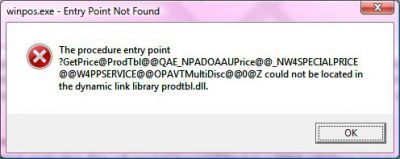
This usually indicates one or more of the files are on a different version The original application files will need to renamed back to their original extension prior to re-running upgrade
c:\enabler>ren *.oxe *.exe
then
c:\enabler>ren *.oll *.dll
Alternatively the *.dll and *.exe files of the previous version can be copied from another till and replaced in the enabler folder. An upgrade can then be re-run to guarantee all files on this machine are on correct enabler version.
Database Migration Failure
NOTE: Database migration failure gets logged in the \enabler\migrate.txt file. Open migrate.txt in notepad to see what database failed to migrate.
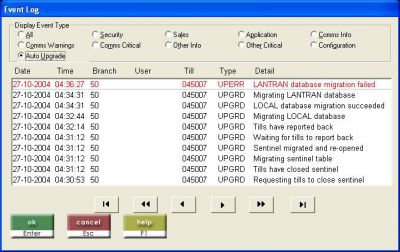
Migration takes empty database files from the \upgbase directory (This is a data dictionary of sorts as the files in upgbase hold the latest fresh database files with the latest correct structures from the last upgrade performed – an upgrade needs to have been performed for the \upgbase folder to exist) and puts them in to your relevant local, lantran etc directories. When this process is performed, the data contained in the existing .dbf files is not lost, it is copied/migrated to the new files, thereby extending the file structure definition without losing data. E.G: posprod.dbf has a new database field added to the file structure. The upgrade will place the new version of this file into the \upgbase folder. When the upgrade process performs the migrate, it will take the pre-existing posprod.dbf from the enabler folder as a starting point, and a copy of the new empty posprod.dbf as the ending point. It reads each record from the existing posprod, and inserts it into the new posprod.dbf. The new posprod is the same as the existing one, except that the .dbf now has the new fields as required by the new version of the software. The upgrade process then runs the re-index process to index the new structures.
If this process is interrupted there is a possibility the migration of the tables has failed so re running the upgrade at this point may result in loss of data.
The basic approach would be to review the tables and if the table size of the all the *.dbf files is less that the copies of the *.old version of the tables then the migration has completed successfully, but if the modified date of the *.old files is current and the *.dbf files size are smaller that the *.old then the migration has not successfully occurred.
Rename the *.old tables with data to .dbf then the upgrade can then be reapplied.
Note:It is not enough to just suspend nibbler if upgrading the store server and the tills are trading. The tills don’t need nibbler to write to the store server – the server should be disconnected from the network for the manual upgrade to run with no interference from tills
